
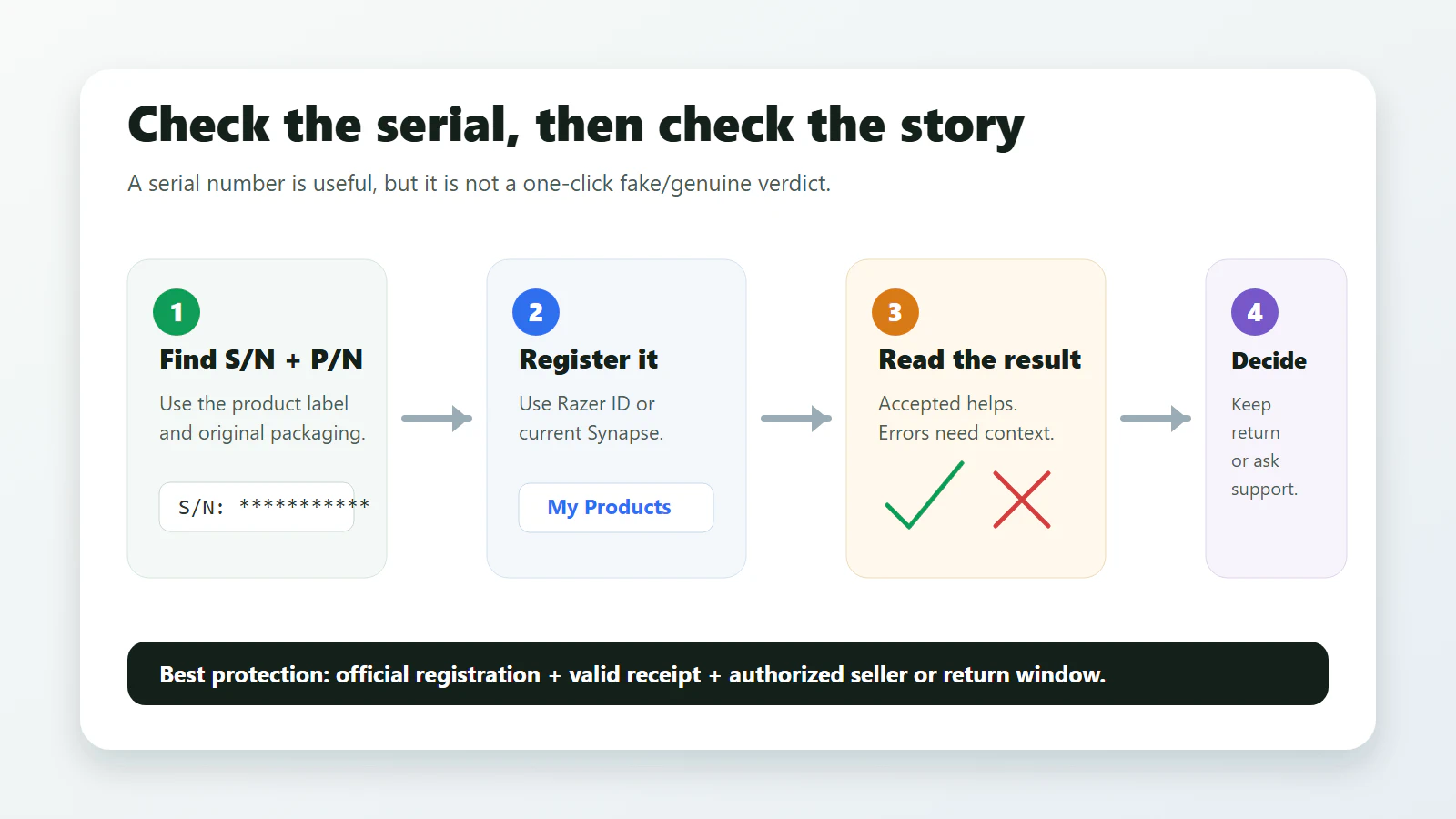
There is no simple public Razer page where every buyer can type a serial number and get a clean “genuine” or “fake” verdict. The official route is more practical: find the serial number and product number, try Razer product registration through Razer ID or Synapse, keep a valid proof of purchase, and treat the seller context as part of the check.
That distinction matters. A serial number can be copied, mistyped, already registered by a previous owner, or rejected because the product number is incomplete. A successful registration is a strong positive signal, but it is not the same as a lab authentication certificate. If you bought the product from a marketplace seller, the receipt, return window and seller reputation matter just as much as the number on the sticker.
Quick Answer
Use registration, not the RazerCare box, as your main check
Go through Razer product registration with your Razer ID or current Synapse. If the product registers, keep the receipt and save the device record. If it fails, first check the serial number, product number, seller story and common character mistakes before calling it fake.
If You Are About to Buy Used or Marketplace Gear
Do not ask a stranger to post the full serial number in public, and do not trust a cropped serial screenshot as the whole proof. Ask for enough evidence to judge the listing without exposing private identifiers:
| Ask for | Why it helps | What to hide |
|---|---|---|
| Photo of the actual product and box label | Confirms the listing is not using only stock photos and lets you compare model, color, layout and accessories. | Middle part of the serial number, full product number if the seller is uncomfortable, and any address labels. |
| Dated receipt or order proof | Razer's warranty policy depends on valid proof of purchase from Razer or an authorized dealer/reseller. | Name, address, payment details, order barcode and full account email. |
| Photo of accessories and dongles | Mice, keyboards and headsets can lose most of their value if the correct wireless dongle, cable, adapter or ear pads are missing. | Nothing sensitive, unless labels show private identifiers. |
| Return window and payment protection | If registration fails or the device is already registered, the return/dispute path matters more than a debate about the sticker. | Payment account details. |
A seller who refuses every practical proof but keeps repeating “serial is real” is not giving you a safe purchase path. Either price it as unsupported used gear or walk away.
What a Razer Serial Number Can and Cannot Prove
Think of the serial number as one piece of evidence, not the whole case.
| Check | What it can tell you | What it cannot prove alone |
|---|---|---|
| Serial number | The device has a Razer-style product identifier to enter into support or registration flows. | That the physical item in your hands is genuine; copied labels and reused numbers are possible. |
| Product registration | Razer accepts the device details into your account or guides you toward support. | That your seller is authorized, the item is new, or the warranty will be honored without a valid receipt. |
| Synapse recognition | A supported device is communicating with Razer software. | That every accessory, receipt and warranty condition is clean. |
| RazerCare page | Whether a qualifying direct Razer purchase may be eligible for a RazerCare plan. | That a product is fake just because the RazerCare check does not find it. |
| Receipt and seller | Whether you have a valid warranty path, return path or payment dispute path. | Hardware authenticity by itself, but it is often the deciding practical evidence. |
The safest answer is usually boring: register it if you already bought it; if you have not bought it yet, prefer Razer, an authorized reseller, or a seller with a clean return window and a real dated receipt.
Step 1: Find the Serial Number and Product Number
Razer says its serial numbers are 15 alphanumeric characters. Depending on the product, the number may be on the device surface, under a laptop, under or near headset padding, under a keyboard or keypad, on the original packaging, or in system information for some laptops.
You usually need both:
S/N: the serial number;P/N, product number or part number: the model-specific number that often sits near the serial.
Use the original packaging if you still have it. Razer’s support article says an incomplete product number can cause registration trouble even when the serial number is typed correctly.
Do not post the full serial number, product number, receipt, Razer ID email or support screenshots publicly. Share them only with Razer support, the seller, your marketplace dispute flow, or your payment provider when needed.
Step 2: Use the Official Registration Route
Use one of these official routes:
- Razer product registration.
- Razer ID product area.
- Current Razer Synapse: sign in, open the
Productstab, then chooseRegister a New Product.
Razer’s current Synapse registration article says registration records your device in its system for faster support resolutions. That is the practical reason to do it: if you later need help, the device details are already tied to your account.
If you are using very old hardware and Synapse 2.0, be careful with outdated instructions. Razer says Synapse 2.0 keeps working on existing PCs, but cloud-related features are no longer supported after October 28, 2025. For a normal current buyer, start with the current Razer ID or Synapse route.
Step 3: Read the Registration Result Correctly
The result matters, but it needs interpretation.
| Result | What it usually means | What to do next |
|---|---|---|
| Product registers successfully | Strong positive signal. Razer has accepted the product details into your account. | Save the device record and keep the dated proof of purchase. You still need the receipt for warranty claims. |
| Serial or product number not recognized | Could be typo, missing full product number, old model mismatch, regional/support issue or a real red flag. | Check the full box label, retry confusing characters, then contact seller or Razer support if it still fails. |
| Already registered | Often points to used, refurbished, resold, re-boxed or gray-market stock. It is not automatically proof of a counterfeit. | If sold as new, ask the seller for resolution immediately. If they stall, use the return or payment dispute window. |
| RazerCare page cannot find it | That page is for RazerCare eligibility on qualifying direct Razer purchases, not a universal authenticity checker. | Do not panic. Use product registration and warranty/support channels instead. |
| Synapse does not detect it | Could be unsupported device, cable/port issue, software issue or suspicious hardware. | Try the official support steps, another USB port/computer if relevant, then combine the result with registration and seller evidence. |
The biggest mistake is treating one failure message as a final verdict. A buyer-friendly workflow is: recheck the numbers, check the seller, preserve the receipt, and escalate before the return window closes.
If that is already your situation, use the support case Razer serial number is not recognized or already registered to collect the right proof before you message the seller or Razer.
Step 4: Do Not Use RazerCare as a Fake Checker
The RazerCare page is easy to misunderstand because it asks for a serial number. Razer describes it as a warranty and RazerCare eligibility check. It says RazerCare Essential may be purchased up to 11 months after purchase and RazerCare Elite up to 15 days after purchase, and the page is aimed at qualifying products purchased directly from Razer.
So if you enter a serial number there and get no useful result, that does not automatically mean the device is fake. It may simply mean:
- the item was not purchased directly from Razer;
- the product is not eligible for that protection plan;
- the purchase window has passed;
- the page is not the right path for general product registration.
Use RazerCare for RazerCare. Use product registration, support and proof of purchase for authenticity and warranty questions.
Step 5: Check the Seller Before You Run Out of Time
Razer’s warranty policy puts heavy weight on valid proof of purchase from Razer or an authorized dealer/reseller. It also warns that products from non-authorized dealers are often used, counterfeit, re-boxed, defective or gray-market goods, and may not qualify for Razer’s limited warranty.
Before buying, or immediately after delivery, check:
- Is the seller Razer, an authorized reseller, or a known store with a real return policy?
- Does the listing say new, used, refurbished, open-box or international version?
- Is the price far below normal market pricing without a clear reason?
- Can the seller provide a dated receipt that names the product and seller?
- Does the box label match the product model, product number and serial label?
- Is the return window still open while you test registration?
If a marketplace seller tells you “the serial is enough” but cannot provide a receipt or return path, treat that as a practical risk. You are not only buying a mouse, keyboard, headset or laptop; you are buying the ability to return it or get support if the story does not check out.
Shopping note: the links below are affiliate links. Price2Click may earn a commission if you buy, at no extra cost to you.
Physical Red Flags Are Clues, Not Courtroom Proof
Packaging and build quality still matter, especially when registration results are unclear. Look for mismatched model names, bad printing, missing accessories, damaged or re-stuck labels, suspiciously light plastic, wrong cable or dongle, and a serial label that looks tampered with.
But do not overread cosmetics. Packaging can vary by region, special edition, bundle and refurb channel. A physical red flag should push you to preserve evidence and start a return/support conversation, not to make a public accusation from a blurry photo.
For high-value products such as a Razer Blade laptop, do more than one check:
- Photograph the box label and device label for your private records.
- Register the product through the official route.
- Save the order receipt and seller page.
- Check that the device model matches the listing.
- Contact Razer support or return the item quickly if the registration/seller story does not line up.
What to Do in Common Situations
You bought it new and registration says already registered.
Treat this as a seller problem first. Ask for a replacement or refund while the return window is open. If the seller claims it is normal, ask for proof and contact Razer support with your receipt.
You bought it used.
Expect possible registration complications. Ask the seller for the original receipt before you buy. If they cannot provide it, price the item as unsupported used gear, not as a warranty-safe purchase.
The product number is not accepted.
Use the full product number from the original box if available. Razer’s support article specifically calls out incomplete product numbers and common character swaps such as O vs 0, I vs 1, Z vs 2, B vs 8, D vs 0, S vs 5, and G vs 6.
Synapse sees the device but registration is messy.
That is a useful positive signal, but keep going. Registration, warranty and proof of purchase are separate pieces. A recognized device can still be used, gray-market or missing a clean receipt.
The RazerCare page says it cannot locate the serial.
Use the registration path instead. RazerCare eligibility is not a universal fake-product lookup.
What to Save Before You Contact Support or Open a Dispute
When a Razer serial check gets messy, the useful evidence is small and specific. Save it while the return window is still open:
- A photo of the box label and device label, with the middle of the serial number blurred if you are sending it outside official support.
- A screenshot of the registration result or error message.
- The exact product name, color, layout, region and product number from the box.
- A screenshot or PDF of the receipt/order page showing seller, date, product description and price.
- Photos of the actual product, accessories, cable/dongle and any obvious label or packaging damage.
- A short note saying where you bought it, whether it was sold as new/used/refurbished/open-box, and whether Synapse detects it.
Do not post the full serial number, full receipt, Razer ID email, address, payment details or support ticket screenshots in a public forum. Share the complete identifiers only inside official Razer support, the marketplace dispute flow, the seller’s private return channel or your payment provider.
FAQ
Is there an official Razer serial number checker for authenticity?
Razer’s public pages do not present a simple general-purpose authenticity checker that returns “genuine” or “fake” for every product. The official reader path is product registration, Synapse/Razer ID, warranty/support, and proof-of-purchase review.
Does successful registration mean my Razer product is genuine?
It is a strong positive signal and useful for support, but do not throw away the receipt. Warranty claims still depend on valid proof of purchase and warranty terms.
Does ‘serial number not recognized’ mean fake?
Not by itself. First check the full product number, original box label and common character mistakes. If the numbers still fail and the seller cannot help, treat it as a return/support issue.
Does ‘already registered’ mean fake?
Not automatically. It can mean the item was used, returned, refurbished, resold, re-boxed or previously registered. If you paid for a new product, that is enough reason to contact the seller quickly.
Can I verify a Razer product before buying it used?
Only partially. Ask for the exact model, photos of the box/device labels with sensitive parts masked, proof of purchase, seller history and a return window. Do not rely on a seller’s screenshot of a serial number as your only protection.
Should I share my full serial number online?
No. Keep serial numbers, product numbers, receipts and account screenshots private. Share them only in official support, seller, marketplace dispute or payment-provider channels.
Final Safe Order
If you already bought the device, follow this order before the return window closes:
- Photograph the product, box label and accessories for your private record.
- Try Razer product registration or the current Synapse registration path.
- If registration fails, use Razer’s serial/product-number troubleshooting and recheck the full product number plus confusing characters.
- If the device was sold as new but appears already registered, incomplete, gray-market or unsupported, contact the seller while the return window is open.
- Use Razer’s warranty policy as the tiebreaker for proof-of-purchase and authorized-seller rules.
- Treat the RazerCare eligibility page as a RazerCare check, not as a universal authenticity checker.
The practical verdict is not “the serial looks real.” The practical verdict is: the product registers or has a support path, the seller can prove the purchase story, and you still have a way to return or dispute it if those two pieces do not line up.