

If you came here for PC builds, start with the build that matches the job. A gaming PC, a quiet family desktop, a creator machine and a local-AI box do not fail in the same places, so copying one random cart is how people end up with a strong GPU, a weak power supply, a cramped case or not enough memory.
Use these as ready build templates: pick the closest lane, copy the part classes into your store tabs, then check the seller, final price, compatibility, warranty and return window before you pay. The price windows below are planning bands, not checkout promises; one GPU sale, store bundle or weak PSU can change the right answer.
Price2Click Build Picks
If you only want the shortlist, start here. These are not live carts; they are the build lanes we would price first before getting lost in motherboard variants, RGB bundles and fake “deal” totals.
| Use case | Cheapest I would build | Best value | No-compromise direction |
|---|---|---|---|
| Gaming | $950-$1,150 1080p | $1,400-$1,700 1440p | $2,200-$3,000 high-refresh / 4K |
| Study / home / office | $600-$750 quiet APU PC | $850-$1,100 all-rounder | $1,200-$1,600 quiet premium desk PC |
| Video / graphics / CAD / 3D | $1,300-$1,600 starter creator PC | $2,000-$2,600 serious creator PC | $3,500+ workstation-style PC |
| Local AI / LLM | $1,400-$1,800 16GB VRAM starter | $2,500-$3,500 24GB-class route | $5,000+ 32GB+ VRAM route |
Build Cards To Price First
These cards are intentionally part-class templates, not fake shopping carts. They tell you what to price, what to protect, and when to walk away. Exact product photos are not used here because a PC build is a bundle of parts; showing one GPU or case as “the build” would overstate the recommendation. Use the cards first, then verify the exact CPU, GPU, motherboard, PSU, case, storage, seller and return path.
Budget 1080p value gaming
The lowest new-parts gaming lane that still feels like a real PC instead of a short-lived compromise.
- Ryzen 5 5600/B550 or AM5 step-up
- RX 9060 XT 16GB or RTX 5060 Ti 16GB
- 32GB RAM
- 1TB/2TB NVMe
- Reviewed 650W PSU
Best value 1440p default
The main gaming build for most people: spend where a 1440p monitor can actually show the upgrade.
- Ryzen 5 7600/9600X class
- RX 9070/9070 XT or RTX 5070 class
- 32GB DDR5
- 2TB NVMe
- 750W ATX 3.x PSU
High-refresh / entry 4K gaming
A premium gaming lane for high-refresh 1440p, ultrawide, ray tracing, streaming, or entry 4K.
- Ryzen 7 9800X3D class
- RTX 5070 Ti / RX 9070 XT / RTX 5080
- 32GB or 64GB RAM
- 2TB+ NVMe
- 850W-1000W PSU
Home / study PC without a discrete GPU
A calm family, school, office, coding and browser PC where noise, SSD size, ports and RAM matter more than a graphics card.
- Ryzen 5 8600G / Ryzen 7 8700G or current Intel iGPU route
- 32GB RAM
- 1TB/2TB NVMe
- Quiet case
- Quality 450W-550W PSU
Video / Blender / design value PC
For people whose apps use both CPU and GPU, but who do not need a certified workstation yet.
- Ryzen 9 9900X/7900-class or gaming-first X3D route
- RTX 5070 Ti / RTX 5080 class
- 64GB RAM
- Separate project SSD
- 850W quality PSU
Local AI learning box
A learning and experimentation PC where VRAM and system memory matter more than normal gaming charts.
- 16GB+ NVIDIA VRAM route
- 64GB system RAM
- 2TB NVMe
- Upgrade-friendly airflow case
- Strong PSU headroom
Serious AI / workstation only if you know the workload
This is not a default shopping lane. It is a proof-first route for 24GB/32GB VRAM, large RAM pools, workstation software or paid production work.
- 24GB/32GB VRAM route
- 96GB-128GB RAM
- 1000W+ PSU
- Large airflow case
- Software-specific proof
Transparent prebuilt can be safer
A prebuilt can win when warranty, time and support matter, but only if the hidden parts are not hidden.
- Visible PSU model
- Visible motherboard
- Visible RAM layout
- Visible SSD model
- Clear cooling and return policy
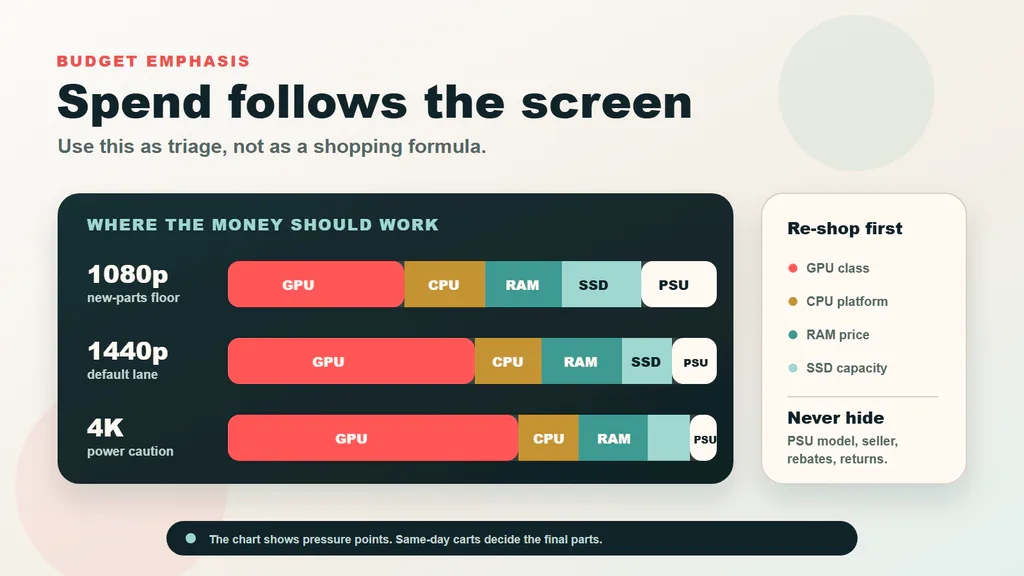
Use the table first. This chart is the sanity check: higher resolution shifts more of the budget toward GPU, power quality and cooling.
If you are upgrading an existing machine and do not know what is inside it, check the CPU, GPU, RAM and storage first with our Windows PC specs guide. Then come back and pick the nearest build lane.
How To Use These PC Builds
Do not read the tables like a fixed shopping list. Read them like a safe route through the parts market.
- Choose the row by what the PC must do most often: gaming, home/office, creator/CAD, or local AI.
- Open the build lane that matches the monitor, workload and budget. If two lanes look close, pick the cheaper one first and upgrade only the part that creates the actual limit.
- Search by the part class, not only by the exact model name. A Ryzen 5 7600 bundle can be better than a 9600X at a bad price; a different 2TB SSD can be fine if it is from a reliable line.
- Re-check the weak links before checkout: PSU model, motherboard features, case clearance, RAM kit, SSD capacity, GPU length, return window and seller.
- If one part spikes in price, do not rebuild the whole PC. Use the swap rules near the end of the guide.
The big market shift is simple: RAM and SSD prices are less sleepy than they used to be, GPU choice now depends much more on the job, and most new non-budget builds are cleaner on AM5. AM4 still has a place in the cheapest gaming lane, but only when it protects the GPU budget instead of trapping you in a dead-end cart. If you are deciding whether to stay on DDR4 or step up to AM5, our DDR4 vs DDR5 RAM gaming guide breaks down true CAS latency, dual-channel subchannel architecture, and why DDR5-6000 CL30 is the gaming sweet spot.
Gaming Builds
Budget 1080p Gaming: About $950-$1,150
For Fortnite, Valorant, CS2, Minecraft, older AAA games and tuned 1080p settings. This is the lowest new-parts gaming PC I would treat as a real recommendation.
| Part | Starting pick | Price check |
|---|---|---|
| CPU + motherboard | Ryzen 5 5600 / 5600X with a B550 mATX board | Check parts |
| Graphics card | Radeon RX 9060 XT 16GB for value; GeForce RTX 5060 Ti 16GB only if NVIDIA features matter | Find GPU |
| Memory | 32GB DDR4-3200/3600, two sticks | Check RAM |
| Storage | 1TB NVMe minimum; 2TB if the jump is small | Check SSDs |
| Power + case | Reviewed 650W PSU and a mesh airflow case | Find basics |
This is an old-platform build on purpose. The Ryzen 5 5600 class is cheap, mature and still fast enough for budget gaming, which lets the GPU do the real work. In this lane, Radeon is the default value route. The RTX 5060 Ti 16GB route only makes sense if DLSS, CUDA, NVIDIA Broadcast or a specific creator/AI tool is part of the reason you are buying the PC.
If the budget is brutal, Ryzen 5 5500 is the cut. If an AM5 bundle lands close enough, Ryzen 5 7600 is the cleaner step-up. Do not rescue a cheap cart by buying a no-name power supply, a sealed-front case or an 8GB GPU that will feel old too quickly. If CS2 is the main game, read our CS2 FPS guide before spending on a bigger GPU. If you are comparing specific 1080p graphics cards, read our 1080p GPU guide.
Best Value 1440p Gaming: About $1,400-$1,700
This is the default gaming build for most people. It is the first configuration where the whole PC feels balanced: modern CPU platform, enough memory, enough SSD space and a GPU that belongs on a 1440p monitor.
| Part | Starting pick | Price check |
|---|---|---|
| CPU + motherboard | Ryzen 5 7600 / 7600X / 9600X with B650 or B850 | Check bundle |
| CPU cooler | Thermalright Phantom Spirit / Peerless Assassin class air cooler | Find cooler |
| Graphics card | Radeon RX 9070 / 9070 XT or GeForce RTX 5070 | Find GPU |
| Memory + storage | 32GB DDR5-6000 CL30-ish and a 2TB PCIe 4.0 NVMe SSD | Check kit |
| Power + case | 750W ATX 3.x PSU and an airflow mid-tower | Find basics |
The money goes where a 1440p PC actually feels better: GPU first, then a clean AM5 platform, 32GB DDR5 and enough SSD space that the first game library is not a cleanup chore. Radeon is the value route when raw FPS matters most; GeForce is the safer route for DLSS, ray tracing, CUDA, Blender and many AI tools. Do not let a fancy motherboard, glass case or RGB bundle steal the money that should be in the GPU and PSU.
1440p GPU Upgrade Planner
GeForce RTX 5070 Live Deals
Take Ryzen 5 7600 over 9600X when GPU money is tight. Move up to RTX 5070 Ti or RX 9070 XT only when the price jump is small enough. Our 1440p graphics card guide goes deeper by monitor and budget.
High-End / Powerhouse Gaming: About $2,200-$3,200
For 1440p high-refresh, heavier ray tracing, streaming, ultrawide monitors and entry 4K. This is the landing lane for readers looking for a powerful custom gaming PC, but the promise is balance, not “the most powerful PC.” The build should feel premium because the frame rate, smoothness, thermals and display match are right, not because every part glows.
| Part | Starting pick | Price check |
|---|---|---|
| CPU + motherboard | Ryzen 7 9800X3D with B650E/B850/X870 board | Check platform |
| Cooling | High-end air cooler or quality 240/280mm AIO | Find cooling |
| Graphics card | RTX 5070 Ti / RX 9070 XT; RTX 5080 when 4K is the point | Find GPU |
| Memory + storage | 32GB DDR5 for gaming; 64GB if streaming/editing is real; 2TB+ NVMe | Check kit |
| Power + case | 850W for upper-midrange GPUs; 1000W for RTX 5080-class builds | Find basics |
The X3D CPU is here because high-refresh games can expose CPU limits that a normal 1440p build hides. The GPU step-up only makes sense if your monitor, game list or creator apps can use it. This is also where case clearance and power-cable room stop being boring details.
Ryzen 7 9800X3D Live Pricing
GeForce RTX 5070 Ti Live Pricing
This lane is worth it when the display can show the upgrade: 1440p at very high refresh, 3440x1440 ultrawide, heavier ray tracing, streaming while gaming, or 4K where the GPU is the real limit. It is not worth it for a basic 1080p monitor, low-settings esports-only play, or a desk where the display is the bottleneck. In that case, buy the value 1440p build and put the saved money into a better monitor first. Our gaming monitor guide is the sanity check before you overspend on the tower.
Powerhouse does not mean maxing every part. Start with GPU and monitor fit, then choose only as much CPU as your games and side work can use. For most gaming, 32GB RAM is still enough; 64GB is for streaming, editing, heavy multitasking or creator overlap. Treat the PSU, case, cable room and cooling as safety parts, not decoration. A premium GPU in a cramped case with a vague power supply is not a premium build.
Keep the creator/workstation lane separate. A gaming powerhouse is about FPS, ray tracing, display fit and sane noise. A workstation-style machine is about CPU cores, GPU acceleration, RAM capacity, storage layout and sometimes certified drivers. If the work is paid rendering, CAD, visualization or local datasets, compare this lane with the creator and workstation sections before buying.
Step down to Ryzen 5 9600X if your games are mostly GPU-bound, or check our guide to the most energy-efficient CPUs for gaming and desktops if you want high frame rates without high thermal output and heavy cooler requirements. Do not buy this while still using a basic 1080p monitor; that money belongs in the display first.
Study, Home and Office Builds
Cheap Quiet PC: About $600-$750
For school, office work, browsing, streaming, light coding, family photos and everyday use. No discrete GPU unless the software needs it.
| Part | Starting pick | Price check |
|---|---|---|
| CPU | Ryzen 5 8600G or current Core i5 with integrated graphics | Check CPU |
| Motherboard | B650/B850 or current Intel board with Wi-Fi if needed | Find board |
| Memory + storage | 32GB DDR5 and a 1TB NVMe SSD | Check kit |
| Power + case | Quiet 450W-550W quality PSU and compact airflow case | Find basics |
| OS / extras | Add Windows cost if you do not already have a license | Check Windows |
Here the win is not FPS. It is a quiet machine that never feels cramped doing normal life: browser tabs, school documents, video calls, photos, streaming and light work. That is why the money goes into memory, SSD and a decent case instead of a graphics card.
Buy a 2TB SSD if family media lives locally. Be careful with tiny cases; they are cute until the cooler, PSU or front-panel cables fight you.
Best Home All-Rounder: About $850-$1,100
For a PC that should stay pleasant for years, handle many browser tabs, light games, school, photo work and occasional upgrades.
| Part | Starting pick | Price check |
|---|---|---|
| CPU route | Ryzen 7 8700G for strong iGPU, or Ryzen 5 7600 if adding a GPU later | Check CPU |
| Motherboard | B650/B850 with Wi-Fi, two M.2 slots and enough USB | Find board |
| Graphics | None for office/home; optional RTX 5060 / RX 9060 class for games | Check GPU |
| Memory + storage | 32GB DDR5 and a 2TB NVMe SSD | Check kit |
| Power + case | 550W-650W quality PSU and quiet airflow case | Find basics |
This avoids the classic family-PC mistake: buying a weak discrete GPU while leaving the machine short on memory or storage. A strong integrated-graphics route is cleaner if games are casual. The Ryzen 5 7600 route is better if you expect a real GPU later.
Add a GPU only when games or GPU apps become real. Otherwise spend on the monitor, a comfortable mechanical keyboard, backup drive and a reliable battery backup UPS before buying a card that mostly idles.
Premium Quiet Desk PC: About $1,200-$1,600
For someone who wants a fast, quiet, long-lasting desktop without gaming-tower drama.
| Part | Starting pick | Price check |
|---|---|---|
| CPU | Ryzen 7 9700X / Ryzen 7 8700G or current Core Ultra 7 class | Check CPU |
| Motherboard | Wi-Fi 6E/7, 2.5GbE, enough USB and two or more M.2 slots | Find board |
| Graphics | None unless needed; RTX 5060 Ti 16GB for light creator or AI work | Check GPU |
| Memory + storage | 32GB for normal use; 64GB for VMs/heavy multitasking; 2TB NVMe | Check kit |
| Power + case | Quiet 650W Gold-class PSU and Fractal / be quiet / Lian Li style airflow case | Find basics |
A premium home PC should disappear into the desk: fast, quiet, easy to maintain and not constantly full. The build pays for quality-of-life parts, not a gaming GPU by default. If it replaces an older Windows 10 PC, check Windows 11 readiness before moving drives or assuming the old license and security settings will be painless.
Add a GPU only when the workload names it. For a non-gaming desk PC, a better display and backup plan may matter more than a graphics card.
Creator, CAD and 3D Builds
Starter Creator PC: About $1,300-$1,600
For Photoshop, Lightroom, Canva-heavy work, 1080p/1440p video edits, student CAD and Blender learning.
| Part | Starting pick | Price check |
|---|---|---|
| CPU + board | Ryzen 5 7600 / 9600X or Core i5 class on a current platform | Check platform |
| Graphics card | GeForce RTX 5060 Ti 16GB | Find GPU |
| Memory | 32GB DDR5; 64GB if large timelines or VMs are real | Check RAM |
| Storage | 2TB NVMe SSD | Check SSD |
| Power + case | 750W ATX 3.x PSU and airflow mid-tower | Find basics |
The RTX 5060 Ti 16GB route is not here because it is the flashiest gaming card. It is here because many creator and AI-adjacent apps like Nvidia support and enough VRAM. The CPU stays sensible so the build can afford memory, storage and a safe PSU. If the total only works by cutting to 16GB RAM, a tiny SSD or a bargain-bin PSU, it is not a creator build yet.
Choose Radeon only if your apps do not care about CUDA/Nvidia acceleration. Buy 64GB RAM before a faster GPU if your actual pain is big projects, many layers or VMs.
Best Value Creator PC: About $2,000-$2,600
For regular video editing, 3D scenes, CAD projects, streaming plus editing and heavier Adobe/DaVinci/Blender workflows.
| Part | Starting pick | Price check |
|---|---|---|
| CPU + board | Ryzen 9 9900X / 7900-class, or Ryzen 7 9800X3D if gaming still leads | Check platform |
| Graphics card | GeForce RTX 5070 Ti 16GB or RTX 5080 when GPU acceleration is central | Find GPU |
| Memory | 64GB DDR5 | Check RAM |
| Storage | 2TB system/app drive plus 2TB-4TB project drive | Check SSDs |
| Power + case | 850W ATX 3.x; 1000W if stepping to RTX 5080 | Find basics |
Paid creative work usually wants more than gaming FPS. The CPU gets more cores, the GPU stays Nvidia-friendly for common creator acceleration, RAM moves to 64GB, and storage separates apps from projects so the machine stays responsive.
If render and encode times are the pain, lean toward the higher-core CPU. If Blender, CUDA, AI tools or GPU-heavy effects are the pain, put the money into the stronger Nvidia card.
No-Compromise Creator / Workstation-Style PC: $3,500+
For paid work where time matters: 4K/8K projects, Blender rendering, heavy CAD/visualization, local datasets and serious multitasking.
| Part | Starting pick | Price check |
|---|---|---|
| CPU + board | Ryzen 9 9950X / 9950X3D, or workstation platform if lanes matter | Check platform |
| Graphics card | RTX 5080 / RTX 5090, or RTX PRO / Radeon PRO if certified drivers matter | Find GPU |
| Memory | 96GB-128GB DDR5, more if projects demand it | Check RAM |
| Storage | 2TB OS/apps, 4TB project drive, separate backup/scratch plan | Check SSDs |
| Power + case | 1000W-1200W reviewed ATX 3.x and large airflow workstation case | Find basics |
This is not a flex build; it is for work where waiting costs money. The extra spend goes into CPU cores, GPU acceleration, RAM headroom, storage layout and reliability. If the software needs certified drivers, a workstation GPU can be less glamorous and still be the right answer.
Do not buy this just for gaming. A high-refresh gaming build will be cheaper, cooler and cleaner.
Local AI and LLM Builds
Local AI Starter: About $1,400-$1,800
For learning local LLMs, image generation, smaller models and AI coding experiments. VRAM matters more than RGB, and 8GB cards get frustrating quickly.
| Part | Starting pick | Price check |
|---|---|---|
| CPU + board | Ryzen 5 7600 / 9600X with B650/B850 | Check platform |
| Graphics card | GeForce RTX 5060 Ti 16GB or another Nvidia 16GB card at a sane price | Find GPU |
| Memory | 64GB DDR5 for serious local models; 32GB only for light experiments | Check RAM |
| Storage | 2TB NVMe SSD | Check SSD |
| Power + case | 750W quality unit and airflow case with room for a future larger GPU | Find basics |
Local AI punishes the wrong kind of bargain. A cheap 8GB GPU may look fast in games and still hit a wall when a model does not fit. This build starts with 16GB Nvidia VRAM and 64GB system memory because that gives a beginner room to actually learn. If the GPU price spikes, hold the build or step sideways; do not “save” the cart by dropping to 32GB memory, a tiny SSD or a questionable PSU.
A used RTX 3090 24GB can be tempting, but only with a trusted seller, sane thermals and warranty risk you can live with.
Serious Local AI: About $2,500-$3,500
For larger local models, heavier image generation, long sessions and mixed creator/AI work.
| Part | Starting pick | Price check |
|---|---|---|
| CPU + board | Ryzen 7 9700X / Ryzen 9 9900X class with a board that has room to grow | Check platform |
| Graphics card | Trusted RTX 4090 24GB route, or newer warranty route if VRAM tradeoff is acceptable | Find GPU |
| Memory | 96GB-128GB DDR5 if model offload and multitasking matter | Check RAM |
| Storage | 2TB system drive plus 4TB model/project drive | Check SSDs |
| Power + case | 1000W reviewed ATX 3.x unit and large airflow case | Find basics |
Serious local AI is mostly a VRAM decision wearing a PC-build costume. The rest of the tower exists to feed, cool and support the GPU without turning every model run into a memory fight. A faster 16GB card can still be worse than a slower 24GB card when the model does not fit.
Do not buy a mystery used flagship as your only plan. Seller, warranty, power connector condition and heat history matter.
No-Compromise Local AI: $5,000+
For people who already know why they need it.
| Part | Starting pick | Price check |
|---|---|---|
| CPU + platform | Ryzen 9 9950X / 9950X3D, or workstation platform if PCIe lanes matter | Check platform |
| Graphics card | RTX 5090 32GB, RTX PRO, or multi-GPU only with software support | Find GPU |
| Memory | 128GB+ system memory | Check RAM |
| Storage | Multiple NVMe drives for models, datasets and projects | Check SSDs |
| Power + case | 1200W+ high-quality PSU and workstation-class airflow | Find basics |
At this level, the expensive part is not just the GPU. It is the full power, cooling, storage and platform plan around the GPU. Multi-GPU is not automatically better; software support, VRAM per card, PCIe lanes, power and heat decide whether it makes sense.
If you do not know exactly which model size, toolchain and batch size you are targeting, buy the serious AI build first and keep the upgrade path open.
CAD, Architecture and Engineering Notes
For AutoCAD, Revit, SolidWorks, Fusion, SketchUp, Rhino and similar tools, do not assume “gaming PC” is always the answer.
- Student and hobby CAD usually fits the starter creator build.
- 3D rendering and visualization usually fit the best value creator build.
- Professional environments that require certified drivers may need RTX PRO / Radeon PRO or a vendor workstation.
- If the project is CPU-light but viewport-heavy, prioritize GPU and RAM.
- If the workload is simulation/rendering-heavy, check CPU core scaling before buying a gaming-first X3D chip.
Where to Price-Check the Cart
After you choose a build, use stores for the thing they are good at. This is not a command to buy from one place. It is a checklist for avoiding the two classic mistakes: copying a stale cart and trusting the lowest seller without checking the return path.
Where to check after choosing a build
Quick Swap Rules
- If the recommended GPU is overpriced, move sideways within the same class before changing the whole build.
- If 32GB RAM costs too much, change the kit, not the platform.
- If a 1TB SSD is close to 2TB pricing, buy 2TB; our SSD buying guide covers the model traps, our NVMe vs SATA guide explains the different SSD types, and our storage decision guide helps balance internal NVMe speed against external backup capacity.
- If a PSU is vague or poorly reviewed, replace it even if the wattage looks fine.
- If a case has poor airflow, pick another case before adding more fans.
- If a store bundle saves money but includes a weak board or RAM kit, price the parts separately.
Before You Order: The Cart Check
This is the boring part that saves the build. Do it with the exact products in your cart, not with the idea of the build in your head.
- Check the motherboard page. Confirm the CPU is supported, the board has the Wi-Fi/Ethernet you need, enough M.2 slots, and the right rear ports for your desk. If the board needs a BIOS update for the CPU, make sure it has BIOS flashback or that the seller ships a recent revision.
- Check the case page. Compare GPU length, CPU cooler height, radiator support if using an AIO, and the number of included fans. A powerful build in a sealed case is not a premium build; it is a heat problem waiting for summer.
- Check the PSU model, not just wattage. A real 750W or 850W unit from a reviewed line is safer than a vague 1000W bargain. For newer Nvidia cards, confirm the ATX 3.x / 12V-2x6 or adapter situation and leave room for the cable bend.
- Check RAM as a kit. Buy two matched sticks, not two separate single sticks. For AM5 gaming builds, DDR5-6000-class kits are the easy target; for creator and local AI builds, capacity matters more than chasing a tiny timing win. See our DDR4 vs DDR5 RAM guide for details on avoiding the 4-DIMM daisy-chain clock-penalty trap.
- Check storage capacity honestly. A 1TB SSD disappears fast once Windows, apps and a few games land on it. For a main gaming or creator PC, 2TB is the comfortable starting point unless the budget is truly tight.
- Check seller and return terms. Marketplace listings, open-box GPUs, old-stock high-end parts and rebate-heavy deals can be fine, but only when the seller, condition, warranty and return window are clear.
If a cart fails one of these checks, fix that part before upgrading anything flashy. Most bad builds are not bad because the CPU was one tier too low; they are bad because the buyer ignored power, cooling, storage or seller risk.
FAQ
Which build should most gamers start with?
The best value 1440p gaming build. It is the clean middle: Ryzen 5 7600/9600X class CPU, RX 9070 / RTX 5070 class GPU, 32GB DDR5, 2TB NVMe and a 750W quality PSU.
What is the cheapest gaming PC worth building?
For new parts, roughly $950-$1,150 is the safer floor for a real discrete-GPU gaming PC. Below that, you are usually shopping used parts, open-box deals or major compromises.
Is 16GB RAM enough?
Only for strict budget builds. For a new gaming, creator or AI PC, 32GB is the default. For creator and local AI work, 64GB or more can be the smarter buy.
Should I buy Nvidia or AMD?
For pure gaming value, compare Radeon hard. For ray tracing, DLSS, CUDA, Blender, many AI tools and some creator workflows, GeForce is often easier to justify.
Do I need a 1000W power supply?
Not for most builds. Budget gaming can use a good 650W unit, value 1440p usually fits 750W, upper-midrange builds often fit 850W, and high-end RTX 5080/5090 or workstation builds can justify 1000W+.
What counts as a powerhouse gaming PC?
A powerhouse gaming PC is the high-end lane for high-refresh 1440p, ultrawide, ray tracing, streaming and serious 4K. It is not the “most powerful PC” in every possible category. The right build balances GPU, monitor, CPU headroom, power supply, cooling, case clearance, memory and storage instead of blindly buying the most expensive part in every slot.
Should I buy prebuilt instead?
Maybe. A transparent prebuilt can win when warranty, time and support matter, especially for a family PC, work machine or first gaming setup where downtime is worse than paying a little extra. Compare it against the nearest build above, then reject any listing that hides the power supply, motherboard, RAM layout, SSD model, cooling layout or return path. A low headline price is not a win if the builder saved money on the parts you cannot see.
Shopping note: prices and availability can change quickly. Check the exact model, seller, condition, warranty, and return window before buying.